Ultimate Guide to Processing Speed for ADHD Professionals
Practical strategies and tools to boost processing speed for ADHD professionals: task breakdowns, routines, digital exercises, and accommodations.

Struggling to keep up in fast-paced work environments due to ADHD? Here's the deal: processing speed - how quickly your brain takes in, organizes, and responds to information - can feel like a bottleneck. But it’s not about intelligence; it’s about efficiency. This guide breaks down practical strategies to help you work smarter, manage tasks, and advocate for support at work.
Key Takeaways:
- What is processing speed? It’s your brain’s ability to process and act on information quickly - not a measure of intelligence.
- Challenges for ADHD professionals: Slow task execution, difficulty in meetings, and "time blindness" can lead to stress and missed deadlines.
- Solutions: Break tasks into smaller steps, use visual tools like mind maps, and practice routines to build efficiency.
- Tools and techniques: Digital exercises (like Schulte Grids and Stroop Tasks) and apps for time management can improve cognitive speed.
- Advocacy at work: Request clear instructions, agendas in advance, or quiet workspaces to perform at your best.
This guide provides actionable steps to navigate workplace challenges and improve cognitive efficiency. Let’s dive in.
What Processing Speed Is and Why It Matters
Definition and Why It's Important
Processing speed refers to how quickly your brain takes in information through your senses, processes it, and responds to it. This process unfolds in three steps: reaction time (perceiving information), response speed (formulating a thought), and output (acting or speaking).
For professionals with ADHD, processing speed plays a key role in daily work scenarios. Imagine your boss asking for a quick update during a hallway chat. Your brain needs to retrieve the right information, organize it, and communicate it clearly - often in just a few seconds. If processing speed is slower, information may slip from working memory before you can use it. This isn’t about lacking ability or knowledge - it’s about how long it takes to access and apply what you already know.
In the workplace, slower processing speed can create challenges like struggling to meet tight deadlines, following verbal multi-step instructions, or completing tasks within what others consider a "reasonable" timeframe - even when you have the skills needed. When faced with a flood of information, your brain can become overwhelmed, leading to delays, mental fatigue, and errors. In fast-paced environments, this can make it harder to keep up during rapid conversations, contribute thoughts quickly, or pick up on subtle cues that come and go in an instant.
Recognizing how processing speed affects work is a crucial step toward understanding the factors that influence it, especially for those with ADHD.
Processing Speed vs. Intelligence
It’s important to note that processing speed reflects cognitive efficiency, not intelligence. You can be incredibly smart, creative, and insightful while still having a slower processing speed. As the Cleveland Clinic explains:
Slow processing speed doesn't mean someone has low intelligence, but it can affect learning and problem-solving.
Think of intelligence as the complexity of your software or the storage size of your hard drive, while processing speed is the speed of your processor.
This misunderstanding often causes issues in the workplace. A slower pace may be misinterpreted as laziness, lack of motivation, or even lower intelligence. The emotional impact can be heavy: this misconception often leads to anxiety, low self-esteem, and underperformance. Studies indicate that about one-third of people with slow processing speed also experience anxiety disorders, and those with the inattentive subtype of ADHD tend to have slower processing speeds compared to those with the hyperactive-impulsive subtype. Recognizing that processing speed isn’t a reflection of intelligence - and helping others understand this - can make a big difference in building a successful career.
Understanding these distinctions sets the stage for exploring the unique challenges faced by ADHD professionals.
What Causes Slow Processing Speed in ADHD
How ADHD Affects Brain Function
Slow processing speed in ADHD is closely tied to differences in brain structure and how the brain communicates internally. Research shows that ADHD is associated with a smaller prefrontal cortex - the part of the brain responsible for managing attention and executive functions like planning and decision-making. These differences are more about the brain's unique wiring than a reflection of intelligence.
For the brain to process information efficiently, it relies on healthy white matter and the right balance of myelin, which helps speed up communication between neurons. However, in ADHD, there’s often an imbalance in key neurotransmitters like dopamine and norepinephrine. These chemicals play a crucial role in managing attention, motivation, and the smooth transfer of information between brain cells. When these systems are out of sync, it becomes harder to focus, process information quickly, and tackle mentally demanding tasks, especially in high-stakes environments like the workplace.
How It Affects Work Performance
These brain-based challenges can create noticeable hurdles in professional settings. For instance, fast-paced meetings can feel overwhelming because the brain needs extra time to process what’s being said and to organize a response. Switching between tasks can be equally draining, as ADHD brains often require 15–20 minutes to fully shift focus.
Another common issue is "time blindness", where time is experienced as either "now" or "not now." This makes it tough to estimate how long tasks will take or to pace work effectively. Combine this with the mental strain of juggling multi-step instructions or processing large amounts of information, and it’s easy to see how "ADHD paralysis" occurs. This term describes the sensation of cognitive shutdown when the brain becomes too overwhelmed to function. Adding to the difficulty, the constant pressure to keep up can lead to chronic stress, which creates a vicious cycle of anxiety and further slows cognitive function.
To navigate these challenges, it’s important to adopt specific strategies that can help improve processing speed and make daily work tasks more manageable.
Slow Processing and ADHD #202
Practical Strategies to Improve Processing Speed
You don’t need to overhaul your brain; the key is learning to work with it. The strategies below are designed to reduce mental strain, build momentum, and handle workplace demands more effectively. These techniques directly address processing delays and help you manage tasks with greater ease.
Break Down Tasks and Add Buffer Time
For professionals with ADHD, micro-tasking is a game-changer. Instead of tackling vague goals like “Organize files,” break it down into smaller, actionable steps such as “Open folder” or “Sort five documents.” This approach eliminates the overwhelming feeling that comes with larger tasks and makes it easier to get started.
When planning your day, make sure to include buffer time in your schedule. Adults with untreated ADHD lose an estimated 22 to 27 days of productivity annually due to difficulties with focus and task transitions. Much of this stems from underestimating how long tasks will take.
To counteract time blindness, use tools that make time visible and tangible, like visual countdown timers, alarms, or clocks. Pair this with transition rituals - simple actions like stretching, tidying your desk, or sipping water - to help your brain shift gears between tasks. These small rituals can significantly reduce the lag that often comes with switching focus.
Use Visual Tools and Organizers
Building on task segmentation, having clear external systems for organization can ease mental strain. As Brain.fm notes:
The brain is designed for having ideas, not for storing them.
That’s why creating an external brain - a trusted system to capture ideas, tasks, and resources - is so effective. This could be a whiteboard, a digital task manager, or even a notebook. The key is to centralize everything in one place, ensuring nothing slips through the cracks and freeing your mind to focus on execution.
Color-coding can also speed up information processing. Assign specific colors to categories - like red for urgent tasks, blue for client work, or green for finances. This transforms abstract information into instant visual cues. Keep it simple by limiting yourself to three or four colors, and post a legend near your workspace to maintain consistency.
For larger, more complex projects, try mind mapping or visual brain dumps. These techniques help break down overwhelming projects into smaller, actionable parts and make it easier to identify your next steps. Combine this with visual time blocking - using color-coded calendar blocks - to create a clear roadmap for your day and stay on track.
Practice Routine Tasks for Faster Execution
Repetition builds automaticity, allowing you to perform tasks with less mental effort. This frees up brainpower for more complex decisions and problem-solving. Start by identifying routine tasks in your workday, such as responding to emails, preparing reports, or organizing documents. Then, create simple, repeatable workflows for each.
Practicing in a low-pressure setting can help you build confidence and efficiency. For example, time yourself while sorting papers or replying to standard emails, gradually increasing your speed as you become more comfortable. Pair these practice sessions with small rewards - like a short break or a treat - to tap into the dopamine boost that keeps ADHD brains motivated.
Another effective technique is batching similar tasks. Grouping emails, phone calls, or creative work into dedicated blocks of time helps your brain stay in one cognitive mode, building momentum and improving speed. Clinical psychologist Sharon Saline, Psy.D., explains:
Routines also build habits which decrease the need for recall as activities become automatic.
When tasks become second nature, you’ll spend less time figuring out how to do them and more time simply getting them done.
Technology and Digital Tools for Processing Speed
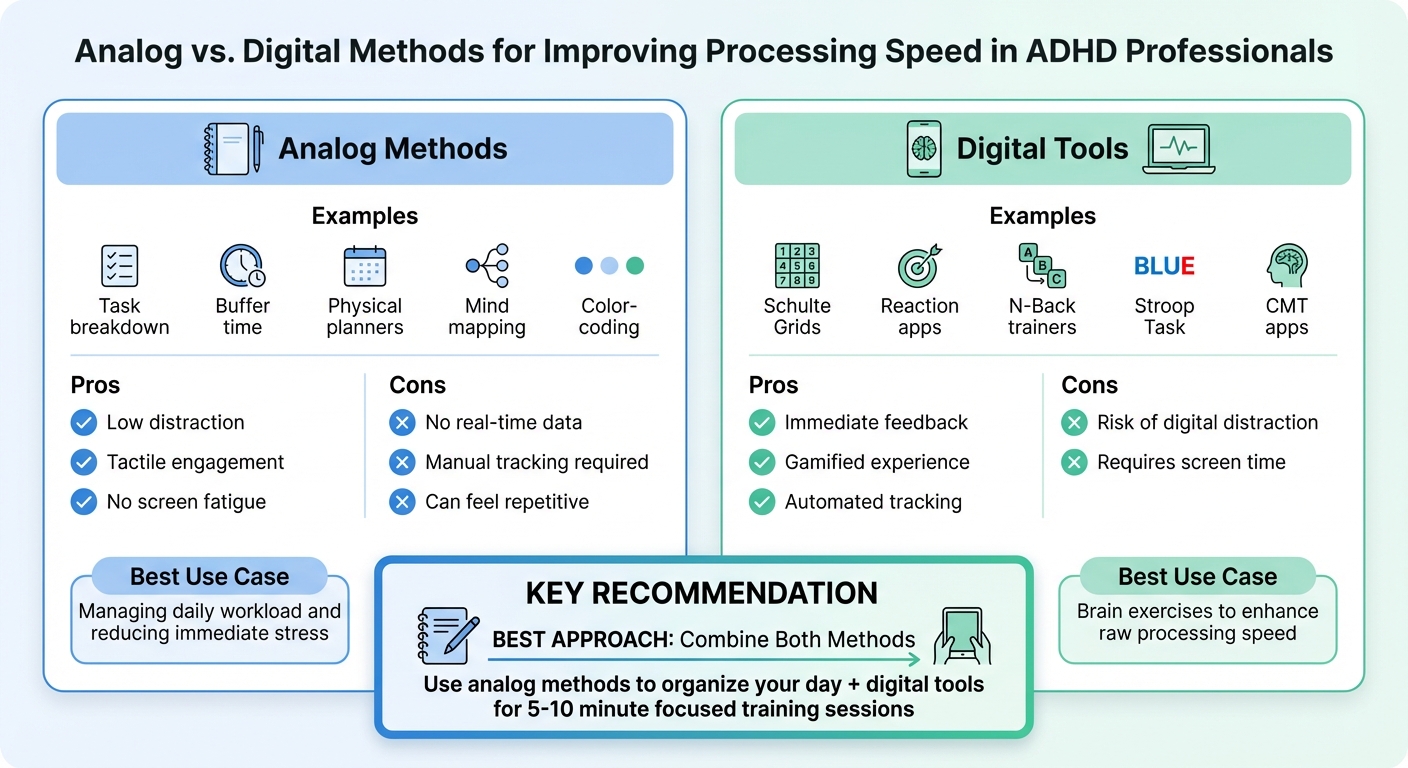
Analog vs Digital Methods for Improving ADHD Processing Speed
Digital tools can enhance processing speed by honing core cognitive functions. Unlike organizational strategies, these tools focus on exercises that improve reaction time, visual processing, and working memory through short, repeatable sessions. Below are examples of specific digital exercises that target these skills.
Digital Training Exercises
Schulte Grids are excellent for training visual attention. These grids, filled with randomly arranged numbers, require you to locate numbers in sequential order. According to ADHD Focus Pro:
A Schulte Grid... is a square matrix filled with randomly arranged numbers that you must find in sequential order. This simple yet powerful exercise trains your brain to process visual information more efficiently while maintaining focused attention.
Beginners can start with a 3×3 grid, aiming to complete it within 60–90 seconds. As you improve, progress to larger grids, such as 5×5, while maintaining the same time goal. Practicing for 5–10 minutes daily, keeping your gaze fixed on the center, can also enhance your peripheral vision.
The Stroop Task is another proven method. This exercise involves naming the color of the ink rather than the printed word (e.g., saying "blue" when the word "red" is written in blue ink). It challenges your ability to control interference and improves processing speed. Similarly, N-Back tasks work on your working memory by requiring you to recall and update items from a sequence "N" steps back.
For those who need to make quick decisions under pressure, Cognitive-Motor Training (CMT) apps like SwitchedOn combine physical movement with random visual and audio cues. SwitchedOn, which boasts over 750,000 users - including more than 100 professional athletes - and a 4.9/5 rating from more than 2,000 reviews, offers over 400 drills designed to improve reaction time and decision-making speed.
Reaction time tests on platforms like MemoryRush are another option. These tests measure how quickly your brain processes visual signals and translates them into physical responses. Monitoring your completion times over 3–4 weeks can help track progress. Many of these tools, including Schulte Grids and reaction time tests, are available online for free and don’t require a login.
Comparison: Analog vs. Digital Methods
Both analog and digital methods play essential roles in improving processing speed. Each has unique strengths, making them suitable for different scenarios.
| Strategy Type | Examples | Pros | Cons | Best Use Case |
|---|---|---|---|---|
| Analog Methods | Task breakdown, buffer time, physical planners | Low distraction; tactile; no screen fatigue | No real-time data; manual tracking; can feel repetitive | Managing daily workload and reducing immediate stress |
| Digital Tools | Schulte Grids, reaction apps, N-Back trainers | Immediate feedback; gamified; automated tracking | Risk of digital distraction; requires screen time | Brain exercises to enhance raw processing speed |
Analog methods are great for structuring your day - breaking tasks into smaller steps, adding buffer time, and using physical planners help reduce stress and keep you organized. Digital tools, on the other hand, offer instant feedback and track progress automatically, making them ideal for focused exercises aimed at boosting cognitive speed.
Combining the two approaches is often the most effective strategy. Use analog methods to organize your day and digital tools for short, consistent training sessions - 5–10 minutes in the morning or during breaks can work wonders.
A practical tip: focus on your biggest challenge first. For example, if you struggle with starting tasks, AI tools like Goblin.tools can break down complex projects into manageable steps instantly. If time management is your main issue, visual time-blocking apps can help you map out your day more clearly. Matching the tool to the specific problem you’re addressing can lead to quicker improvements.
Self-Awareness and Workplace Advocacy
Know Your Strengths and Limitations
Processing speed reflects how efficiently your brain handles tasks, not how smart you are. Recognizing where you face challenges is the first step to working in alignment with your brain’s natural tendencies.
When tackling work tasks, focus on three main areas: reaction time, which is how quickly you notice new information (like realizing someone asked you a question in a meeting); response speed, or the time it takes to think through your answer; and output, which is the time required to act, such as typing an email or speaking.
Your ADHD subtype also matters. If you have predominantly inattentive ADHD, you may experience slower processing speeds compared to those with hyperactive-impulsive ADHD. On the flip side, processing challenges aren’t always about slowness - some people process information too fast, leading to impulsive decisions, mental fatigue, or missing important details in tasks that require careful attention. Take note of patterns in your work. Are you often the last to finish tasks? Do you need to re-read instructions frequently? Or do you sometimes rush through decisions just to get them done?
For a deeper understanding of how your brain works, neuropsychological testing can help. The Wechsler Adult Intelligence Scale (WAIS) is a trusted tool, especially its Processing Speed Index, which measures skills like visual scanning and coding. This data can be invaluable when discussing accommodations with your employer. With greater self-awareness, you’ll be better equipped to advocate for the support you need.
How to Advocate for Your Needs at Work
Once you understand your cognitive profile, you can approach workplace advocacy with confidence. ADHD affects 3.5% of the U.S. workforce, yet many workplace policies fail to address the unique challenges it presents. Advocacy starts with focusing on your strengths. Instead of saying, "I’m slow", frame your needs as tools that enhance your ability to deliver high-quality work. For example, explain how accommodations like quiet workspaces or written instructions help you maximize your analytical skills.
Be clear and specific about what you need. If fast-paced meetings overwhelm you, request written summaries or notes to supplement verbal instructions. This addresses response speed delays and ensures you can fully engage. Similarly, ask for meeting agendas ahead of time so you can prepare your thoughts before discussions. Requesting extra time to process and respond isn’t about weakness - it’s about ensuring your output meets your high standards. As the Cleveland Clinic emphasizes:
Processing speed isn't just about being fast, though. It's also about accuracy.
Environmental adjustments can also make a big difference. Ask for noise-cancelling headphones or access to quiet areas to reduce distractions that slow down your cognitive processing. When tackling large projects, ask your manager to break them into smaller, more manageable steps with clear goals. You might also suggest shifting some communication to written formats, like email or Slack, which allow you to craft thoughtful responses without the pressure of immediate verbal exchanges. These strategies can help you work more efficiently and effectively.
When discussing accommodations with your employer, focus on how small changes boost your performance. You don’t need to disclose your full medical history - just explain how specific adjustments help. For instance, you could say, "I work best when I can review materials before meetings. Could the agenda be shared a day in advance?" This approach not only reduces stigma but also shows that you’re proactive about optimizing your work.
Medication and Lifestyle Factors
How Medication Can Help Processing Speed
ADHD medications work by increasing dopamine and norepinephrine levels in the brain - two chemicals essential for attention, motivation, and processing speed. These medications improve how neurons communicate, which helps the brain process information more quickly. Stimulant medications like Adderall and Concerta often show noticeable effects within a few days, while non-stimulants like Strattera (atomoxetine) may take 3–4 weeks to reach their full effect.
Choosing the right medication involves finding a balance between effective symptom management and minimizing side effects. Extended-release options provide consistent symptom control for 6–16 hours, making them ideal for workdays, while immediate-release versions last about 4 hours and may need to be taken multiple times a day. Dr. John Kruse, a psychiatrist and neuroscientist, emphasizes:
The best medication is the one that controls your symptoms with the fewest side effects.
To fine-tune your dosage, consider tracking work-related tasks - like how quickly you respond to emails or complete reports - over several days. Be mindful of the "rebound effect", where a short-acting medication may cause a sudden drop in energy or mood as it wears off. Since around 80% of people taking stimulants experience reduced appetite, taking medication after meals or adding a protein shake during the day can help maintain energy levels.
When combined with healthy lifestyle habits, these medications can significantly improve processing speed.
Lifestyle Changes That Support Brain Function
Lifestyle adjustments can complement medication and further enhance brain function. Regular exercise, for example, naturally increases dopamine and norepinephrine levels. Breaking activity into four 15-minute sessions can be just as effective as one continuous hour for managing ADHD symptoms. Activities that involve both physical coordination and learning - such as martial arts, basketball, or dance - can strengthen brain areas responsible for executive function and processing speed.
Sleep is another critical factor. It allows the brain to consolidate information learned during the day, which is essential for attention and processing speed. As Joel Nigg, Ph.D., explains:
Restful, restorative sleep is a powerful tool for regulating mood and maintaining attention throughout the day. Adequate sleep also powers learning.
To improve sleep quality, aim for a consistent bedtime within a 30-minute window each night, and limit screen time 60–90 minutes before bed to reduce blue light exposure, which can interfere with hormone production.
Nutrition also plays a key role in supporting brain health. Omega-3 fatty acids, found in fish and nuts, are essential for strong neural connections, as the brain is largely made of fat. Adults are advised to consume at least 1,000 mg of omega-3s daily. Additionally, starting the day with a protein-rich breakfast before taking stimulant medication can help stabilize energy and focus throughout the day. It may also be worth discussing with your doctor whether you should be tested for deficiencies in zinc, iron, or Vitamin D, as these nutrients are important for focus and impulse control.
Summary and Action Steps
Processing speed refers to how efficiently your brain takes in, interprets, and reacts to information. For professionals with ADHD, slower processing can create a disconnect between their innovative ideas and the ability to act on them quickly. The encouraging news? It’s possible to improve this through a combination of strategies like cognitive training, adjusting your environment, leveraging digital tools, and advocating for support in the workplace.
To begin, break large tasks into smaller, more manageable pieces. This reduces mental strain and helps build momentum. Techniques like 25-minute Pomodoro sessions, speech-to-text apps, and digital planners can help you externalize tasks and remain consistent.
Your environment matters, too. Simplify your workspace by clearing visual clutter and consider using noise-canceling headphones to cut down on sensory distractions. In professional settings, ask for meeting agendas ahead of time to process information in advance, and lean on written communication - like emails or Slack messages - when you need extra time to craft responses.
It’s also important to track your progress. Time yourself on recurring tasks and explore cognitive training tools like BrainHQ or Cogmed, which provide insights into reaction times and working memory. Keep in mind that ADHD brains often need 15–20 minutes to refocus after switching tasks. Building transition rituals, such as stretching, can help your brain reset and re-engage more effectively.
FAQs
How do I know if my issue is processing speed or attention?
Processing speed refers to how fast your brain takes in, makes sense of, and reacts to information. If you find yourself needing extra time to complete tasks, follow instructions, or keep up with conversations, it might point to a processing speed challenge. On the other hand, attention issues are marked by trouble maintaining focus or being easily distracted. Since these two challenges can sometimes overlap, getting a professional evaluation is essential to pinpoint the core issue and discover effective strategies.
What are the best quick workplace accommodations to ask for?
Managing ADHD-related challenges with processing speed in the workplace can be made easier with a few simple adjustments. Some of the most effective accommodations include:
- Allowing extra time for tasks: This helps reduce stress and ensures tasks are completed accurately.
- Providing written instructions: Clear, written guidelines make it easier to stay on track and avoid misunderstandings.
- Offering flexible breaks: Taking breaks as needed can help maintain focus and prevent burnout in high-pressure settings.
These small changes can make a big difference in creating a more supportive and productive work environment.
How can I track processing speed improvements at work?
Tracking how quickly you complete tasks can help you identify areas for improvement and measure progress over time. Start by establishing a baseline - time yourself while completing common tasks like writing reports or responding to emails. Use a timer and record how long each task takes.
Once you’ve logged your data, look for trends. Are certain tasks taking less time as you practice? Are there specific distractions slowing you down? Use this information to refine your approach. For example, you might try reducing interruptions or breaking larger tasks into smaller, more manageable chunks.
Make it a habit to review your data regularly. This will not only help you see how far you’ve come but also allow you to set new, realistic goals to keep improving.