Ultimate Guide To ADHD Information Overload
Manage ADHD information overload: simplify choices, break tasks into micro-steps, set routines, and cut digital distractions.
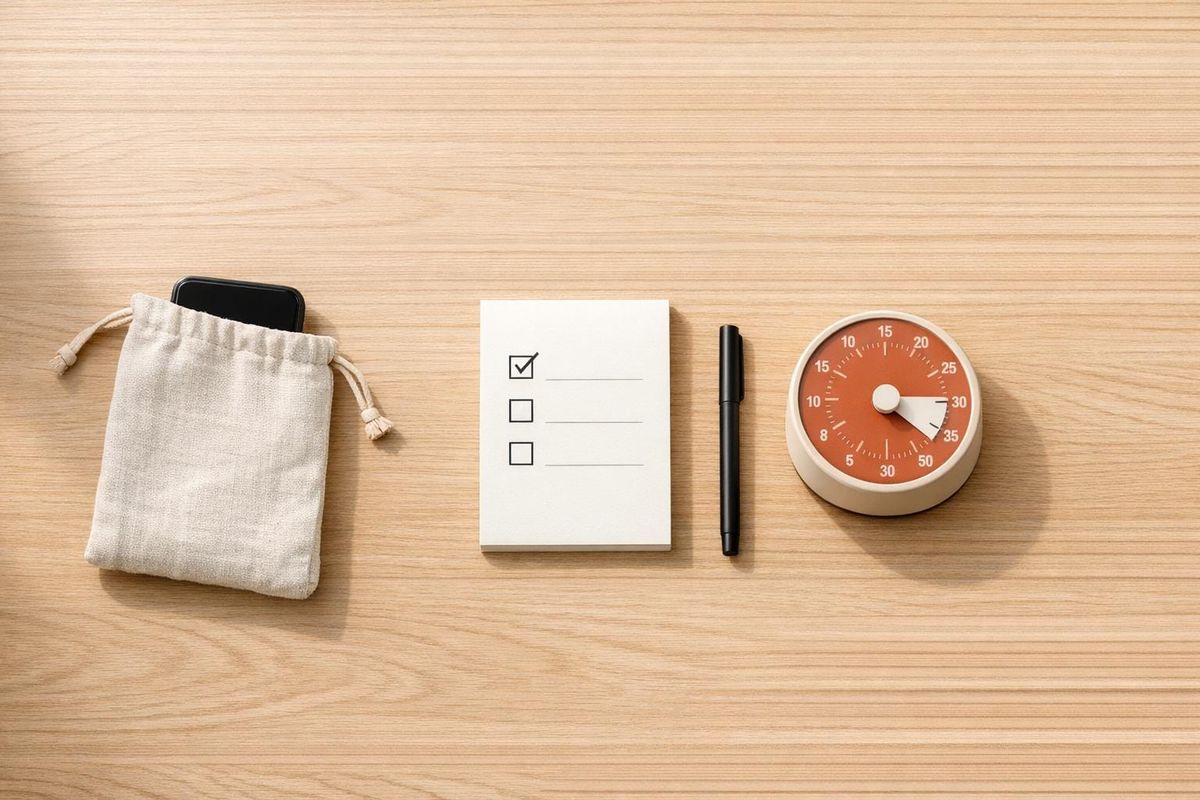
ADHD information overload feels like drowning in tasks, decisions, and distractions. For individuals with ADHD, even simple things - like managing emails or making daily decisions - can cause stress and shutdowns. This happens because ADHD brains struggle to filter out unimportant information, leading to overwhelm.
Key takeaways to manage ADHD information overload:
- Break tasks into smaller steps: Focus on one small action at a time.
- Reduce decision fatigue: Use decision rules or defaults to simplify choices.
- Set routines and boundaries: Create daily habits and minimize distractions.
- Organize your workspace: Declutter your physical and digital spaces.
- Use tools wisely: Schedule emails, use timers, and limit notifications.
The goal isn’t to work harder but to set up external systems that support your brain’s needs. Start small, experiment, and build habits that help you stay in control.
ADHD Paralysis: Why Information Overload Is Secretly Keeping You Stuck
sbb-itb-f879324
What Causes Information Overload and How It Affects You
ADHD Information Overload Statistics and Impact
What Triggers Information Overload
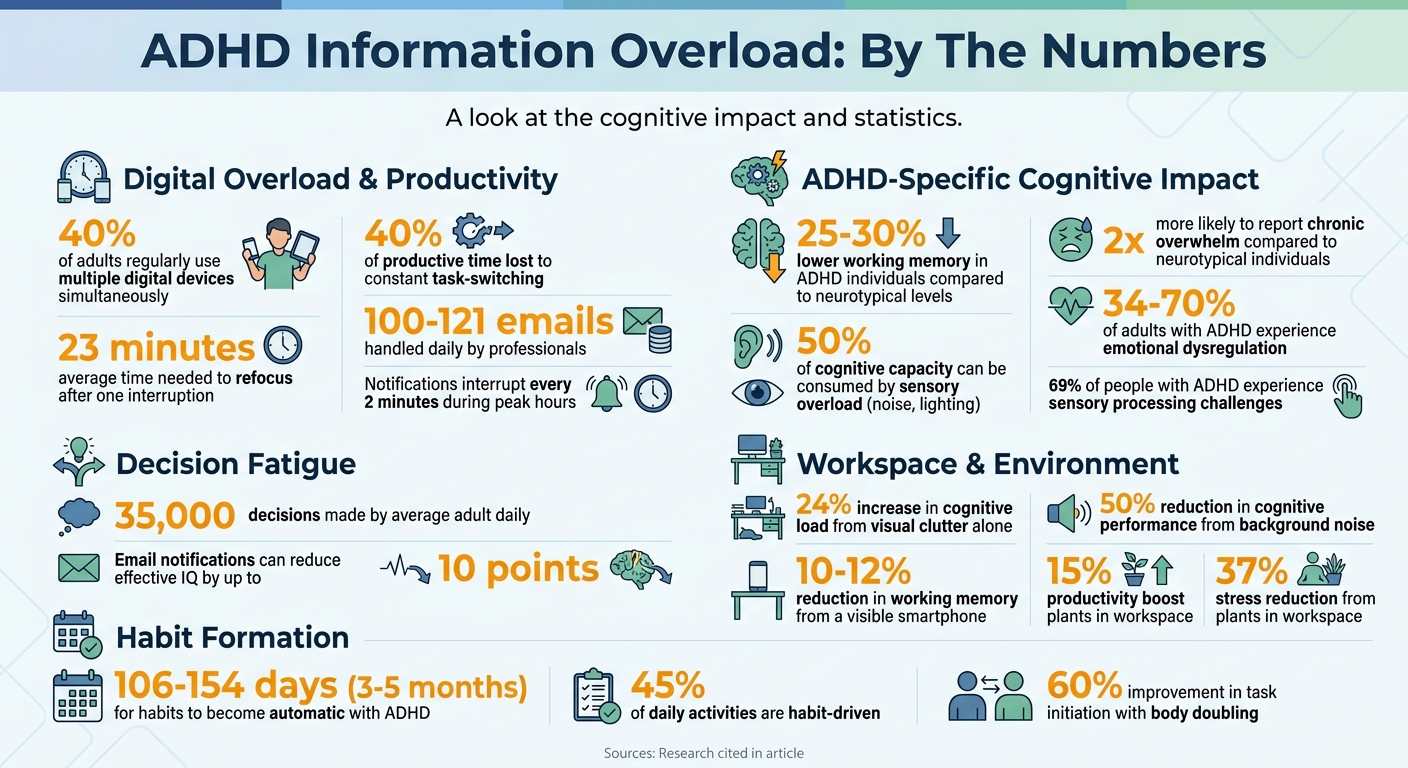
For ADHD professionals, the causes of information overload go beyond just a packed schedule. It’s more about how the brain processes incoming information. One major culprit? Digital multitasking. About 40% of adults regularly juggle multiple digital devices, which spikes stress levels and reduces productivity. For those with ADHD, jumping between emails, messaging apps, and project reports doesn’t just slow things down - it disrupts mental flow. Each interruption forces the brain to switch contexts, and research shows it takes an average of 23 minutes to refocus after just one interruption.
Another factor is decision fatigue. Every time you get an email or notification, you face a micro-decision: Should you read it, act on it, or ignore it? ADHD brains often struggle to automate these small choices, which drains dopamine reserves faster. By the afternoon, you might feel completely wiped out - not because of the workload, but due to the mental toll of all those tiny decisions.
Sensory overload adds another layer. Things like background noise or harsh lighting can sap up to half your cognitive capacity before you’ve even started tackling your tasks. Overcommitting to avoid conflict only makes the situation worse. These triggers don’t just scatter your focus - they set the stage for deeper neurological challenges.
How Overload Makes ADHD Symptoms Worse
When information overload strikes, it doesn’t just cause stress - it can lead to a neurological shutdown. Here’s what happens: the prefrontal cortex (the part of your brain responsible for planning and focus) essentially goes offline, while the amygdala (your brain’s threat detector) takes over. This state, often called "activation failure", leaves you unable to start tasks, even if you know exactly what needs to be done.
The constant task-switching alone can eat up to 40% of your productive time. Over time, this chronic overload can lead to ADHD burnout, which comes with emotional numbness, cynicism, and relentless self-blame. Adults with ADHD are twice as likely as neurotypical individuals to report feeling chronically overwhelmed, and emotional dysregulation affects between 34% and 70% of adults with ADHD.
Physical symptoms often accompany unmanaged overload, too. Common signs include jaw clenching, shoulder tension, and chest tightness - clear indicators that your body is stuck in a "freeze" response. No amount of sheer willpower can override this - it’s not about trying harder but about recognizing the brain’s limitations in filtering information. Understanding this can help shift the focus from self-blame to building external systems that align with your cognitive needs.
How to Manage and Prevent Information Overload
Breaking Tasks Into Smaller Steps
Tackling large projects can feel impossible, especially when faced with the daunting thought of everything that needs to get done. The trick? Focus on the next small step. Instead of jotting down "finish quarterly report" on your to-do list, break it into the tiniest actionable task, like "open the spreadsheet" or "write the first sentence of the summary". This method, often called the "One Next Step" Rule, helps bypass the overwhelming mental block that can come with big tasks.
For individuals with ADHD, working memory is 25%-30% lower than neurotypical levels. Trying to juggle an entire project in your mind can quickly lead to overload. Instead, break tasks into bite-sized steps that take less than 15 minutes. Commit to just one short session at a time. These quick wins release dopamine, giving you the motivation to keep going without feeling drained.
Traditional to-do lists can sometimes backfire, becoming "activation traps" where tasks fight for your attention. A better approach? Schedule specific subtasks into your calendar with set times. For example, instead of vaguely planning to "review client feedback", schedule it for Tuesday at 10:00 AM. This way, you focus on doing rather than deciding when to do it. Another helpful strategy is the "3 Today" Method, which limits your daily focus to just three tasks. This transforms an overwhelming list into a manageable, clear plan.
Making Decisions Without Getting Stuck
Once tasks are streamlined, the next challenge is decision-making. Did you know the average adult makes about 35,000 decisions every day? For an ADHD brain, each of these choices feels like an active decision, leading to mental fatigue. Reducing the number of decisions you need to make can ease this burden.
One way to simplify is by creating decision rules. For example, you might decide, "If it costs under $20 and I need it, buy it without overthinking", or "If I can't decide in five minutes, flip a coin". For recurring decisions, defaults work wonders - like always buying the same brand of coffee or sticking with a capsule wardrobe. These strategies aren't about cutting corners; they're about conserving mental energy.
When you do need to make a thoughtful decision, limit your options to no more than three. Research shows that "satisficers", who choose the first option that meets their needs, are generally happier than "maximizers", who exhaustively search for the perfect choice. Try tackling important decisions during your peak mental hours, typically in the morning or after medication has taken effect.
For emotionally charged decisions, the 24-Hour Rule can be a lifesaver. By waiting a full day before responding, you give your brain time to process, helping prevent impulsive reactions. To keep administrative tasks from piling up, set aside a dedicated time - like Friday at 2:00 PM - to handle them all at once. This prevents these small tasks from disrupting your week.
Setting Up Routines and Boundaries That Work for ADHD
"Overwhelm isn't a volume problem - it's a filter problem. The ADHD brain doesn't receive more input than anyone else's. It just has fewer tools to decide what to do with it." - Harold Meyer, Founder, The ADD Resource Center
Routines and boundaries act as external filters when internal ones fall short. Start your day by identifying three priorities while your mind is fresh. At the end of the day, reflect on what you accomplished and set three key tasks for tomorrow. This habit helps keep unfinished tasks from carrying over and adding to your stress.
Structured routines also help manage overwhelm. For instance, establish a "digital sunset" by shutting down devices before bed. During work hours, consider using "headphone hours" or website blockers to minimize distractions and create focused time for deep work.
Body doubling - working alongside someone else, either in person or via video - can also provide the accountability many ADHD brains need. And when sensory overload strikes, having a designated low-stimulation workspace can make all the difference. A calming environment with soft lighting and minimal noise offers a refuge from overwhelming input, especially since up to 69% of people with ADHD experience sensory processing challenges. These systems help create lasting habits to manage information overload effectively.
Digital Tools and Workspace Setup to Reduce Overload
Refining both your digital and physical workspaces is a crucial step in managing information overload and maintaining focus.
Controlling Email and Digital Distractions
Email can be a major drain on your mental energy. On average, professionals handle 100–121 emails daily, with notifications interrupting them every 2 minutes during peak hours. These interruptions disrupt deep work, and it takes about 23 minutes to regain full concentration after each one.
To minimize this, turn off email notifications across all devices. Constantly checking your inbox can reduce your effective IQ by up to 10 points. Instead, create 2–3 fixed times to process emails (e.g., 9:00 AM, 1:00 PM, and 4:30 PM). This approach helps you protect your focus and avoid the fragmented attention that can exacerbate ADHD symptoms.
"The goal isn't inbox zero. The goal is zero friction. An empty inbox you check 34 times a day is worse than a 200-email inbox you process efficiently in two sessions."
- Icebox Content Team
When you do check emails, try the "Only Handle It Once" (OHIO) method: delete, delegate, respond (if it takes less than 2 minutes), defer (using the snooze feature), or complete the task. The snooze function is particularly helpful - it hides emails until you're ready to tackle them. For newsletters and subscriptions you rarely read, unsubscribe immediately. Tools like Clean.email make this process quick and painless.
AI-powered email tools can also help by automatically sorting messages into categories like Newsletters, Team, or Outreach. Services like Superhuman (around $30/month) and Spark Mail offer these features, while Inbox Zero provides free bulk-unsubscribe options.
Here’s a quick comparison of email filtering tools in Gmail and Outlook:
| Feature | Gmail Filters | Outlook Rules |
|---|---|---|
| Primary Organization | Uses "Labels" (emails can have multiple) | Uses "Folders" (emails typically reside in one) |
| Automation Tool | Filter settings (search criteria → action) | Rules Wizard (Home → Rules → Manage Rules) |
| Visual Cues | Color-coded labels/stars | Color-coded "Categories" |
| Triage Features | Snooze, Multiple Inboxes, Priority Inbox | Focused Inbox, Conversation View, Quick Parts |
| Templates | "Templates" (formerly Canned Responses) | "Quick Parts" (Insert → Quick Parts) |
Once your digital distractions are under control, focus on creating a physical workspace that enhances concentration.
Optimize Your Workspace for Focus
Your physical environment plays a big role in maintaining focus. Visual clutter alone can increase cognitive load by 24%. Even a silent smartphone on your desk can reduce your working memory by 10–12%.
Start with the "Arms-Reach Rule": keep only frequently used items within easy reach, and store everything else out of sight to reduce visual distractions. Assign each item a specific "home" on your desk - this "One-Home Rule" helps reduce decision fatigue and eliminates unnecessary scanning that drains mental energy. At the end of each day, spend 5 minutes tidying up: return items to their spots, clear surfaces, and toss out trash. This habit sets you up for a more focused start the next day.
To manage time better, place a large analog clock or visual timer in your workspace. This combats time blindness and helps you stay on track. Use a whiteboard to break down big projects into smaller, actionable tasks, and consider displaying a prioritization tool like the Eisenhower Matrix to make decisions easier.
Noise can be another productivity killer. Noise-canceling headphones (-25 to -30 dB) can block out background sounds, which can otherwise reduce cognitive performance by up to 50%. If you struggle with restlessness, try a standing desk, balance board, or under-desk cycle to keep your energy levels up. Adding plants to your workspace can also help - they’ve been shown to boost productivity by 15% and lower stress by 37%.
Lastly, adopt a "Phone Quarantine Protocol": keep your smartphone in another room during deep work sessions to avoid its constant pull on your attention.
"We often design our offices for the person we wish we were, not the person we actually are."
- Matthew Ryan, LCSW, PRGRS Therapy
Building Habits That Last
Once you've set up your workspace and digital tools, the real challenge begins: making those changes stick. For professionals with ADHD, habit formation isn't just about willpower - it's about creating external structures to support executive functions.
Clearing Mental and Physical Clutter
Working memory has its limits, and for individuals with ADHD, it tends to be 25% to 30% lower than the neurotypical baseline. That’s why brain dumps - writing down every thought, task, and concern on paper or in a digital note - are so important. This practice frees up mental space, making it easier to focus.
Physical clutter can be just as draining. Following the "One-Home Rule", where every item has a designated spot, can help. Spend five minutes at the end of each workday tidying up: return items to their places, clear surfaces, and toss out trash. This small routine can set you up for a more focused tomorrow. The same goes for your digital space - schedule regular sessions to archive old files, unsubscribe from unnecessary emails, and review the apps you actually use.
To avoid getting overwhelmed by endless to-do lists, try the "3 Today" Method. Focus on just three essential tasks each day. These strategies to reduce clutter - both mental and physical - lay the groundwork for building habits that last.
Maintaining Progress With ADHD-Friendly Systems
Once your environment is decluttered, the next step is to implement systems that help you maintain momentum. Building habits, especially with ADHD, often takes longer than expected. While the popular idea is that habits form in 21 days, research shows it actually takes between 106 and 154 days (roughly three to five months) for behaviors to become automatic. Considering that up to 45% of daily activities are driven by habits, the effort is well worth it.
One effective method is habit stacking - linking a new habit to something you already do. For instance, you could check your planner while your coffee brews or jot down a quick brain dump as your computer powers on. Another helpful tool is body doubling, where you work alongside someone else either in person or via video call. This technique can boost task initiation by almost 60%. These approaches work hand-in-hand with the external supports discussed earlier.
| Strategy | Purpose | ADHD-Specific Benefit |
|---|---|---|
| Habit Stacking | Consistency | Leverages existing routines to trigger new habits |
| Body Doubling | Accountability | Provides external stimulation to maintain focus |
| Brain Dump | Mental Clarity | Eases the burden on limited working memory |
| The 1% Rule | Sustainability | Lowers the barrier to starting tasks |
When it comes to planning systems, choose what suits you best - paper or digital. Paper planners offer a tactile experience and fewer distractions, while digital planners provide reminders and flexibility. Many people find a hybrid approach works best: use a digital calendar for appointments and reminders, and a paper planner for focused, deep work.
Lastly, create a Planner Recovery Protocol - a guilt-free system to help you restart after falling off track. Aim to recover within 48 hours instead of dwelling on missed days. Think of executive function like a limited resource rather than an endless supply of willpower. The goal isn’t about being flawless; it’s about designing systems that align with how your brain operates, making progress sustainable and achievable.
Conclusion: Taking Control of Information Overload
ADHD-related information overload often comes down to the brain’s difficulty in filtering what’s important from what’s not. Harold Meyer from The ADD Resource Center explains it perfectly:
"Overwhelm isn't a volume problem - it's a filter problem. The ADHD brain doesn't receive more input than anyone else's. It just has fewer tools to decide what to do with it".
Understanding this difference can shift how you approach daily hurdles.
The strategies outlined here work because they rely on external systems rather than sheer willpower. Tools like brain dumps, calendars, and digital aids compensate for ADHD’s 25%-30% reduced working memory. They help keep you within your cognitive limits and prevent those freeze responses that often come with overwhelm. Methods such as the 3-Item Rule maintain focus, physical resets can break stress-induced shutdowns, and minimizing environmental distractions reduces sensory overload. Adapting these techniques to your specific triggers makes them even more effective.
The key is tailoring these strategies to your needs. Whether your overload is cognitive, emotional, or sensory, personalization is crucial. For instance, what helps you navigate decision paralysis might not be as effective for sensory overwhelm. Pay attention to warning signs like mental fog or irritability, and tweak your approach as needed.
Managing information overload isn’t about striving for perfection. It’s about building external systems that align with how your brain works. Start small, experiment, and use these tools to complement your ADHD strengths.
FAQs
How can I tell if I’m overloaded or just procrastinating?
To figure out if you're overwhelmed or just procrastinating, think about whether your challenge is tied to executive dysfunction or an intentional delay. Feeling overloaded often resembles mental paralysis - you can't prioritize tasks or even get started. Procrastination, however, tends to be a deliberate choice, often driven by low motivation or emotional avoidance. Pinpointing the root cause can guide you toward the right approach for tackling your to-do list.
What should I do first when I’m already in shutdown?
When you're experiencing a shutdown, it helps to start by creating a calm, quiet space to minimize sensory input. Focus on simple, manageable actions like practicing grounding techniques, taking deep breaths, or just allowing yourself to pause. These small steps can help ease the intensity of your emotions, giving your mind the chance to reset. The aim is to reduce the overwhelm and create space to process things at your own pace.
Which tools actually help without adding more clutter?
Apps like Sunsama, Tiimo, Focus Keeper, Brain.fm, TickTick, Forest, and Todoist are great for simplifying routines and supporting executive functions. These tools reduce friction, help with time management, and make starting tasks easier. For those looking to minimize distractions and streamline their workflow, options like Akiflow and AI-assisted tools can also be highly effective. The key is to pick tools that match your natural working style to keep things simple and avoid adding unnecessary complexity.