Sensory-Friendly Workspace Tips for ADHD Professionals
Create a sensory-smart workspace—adjust lighting, seating, noise and sensory tools—to reduce overload and boost focus for adults with ADHD.
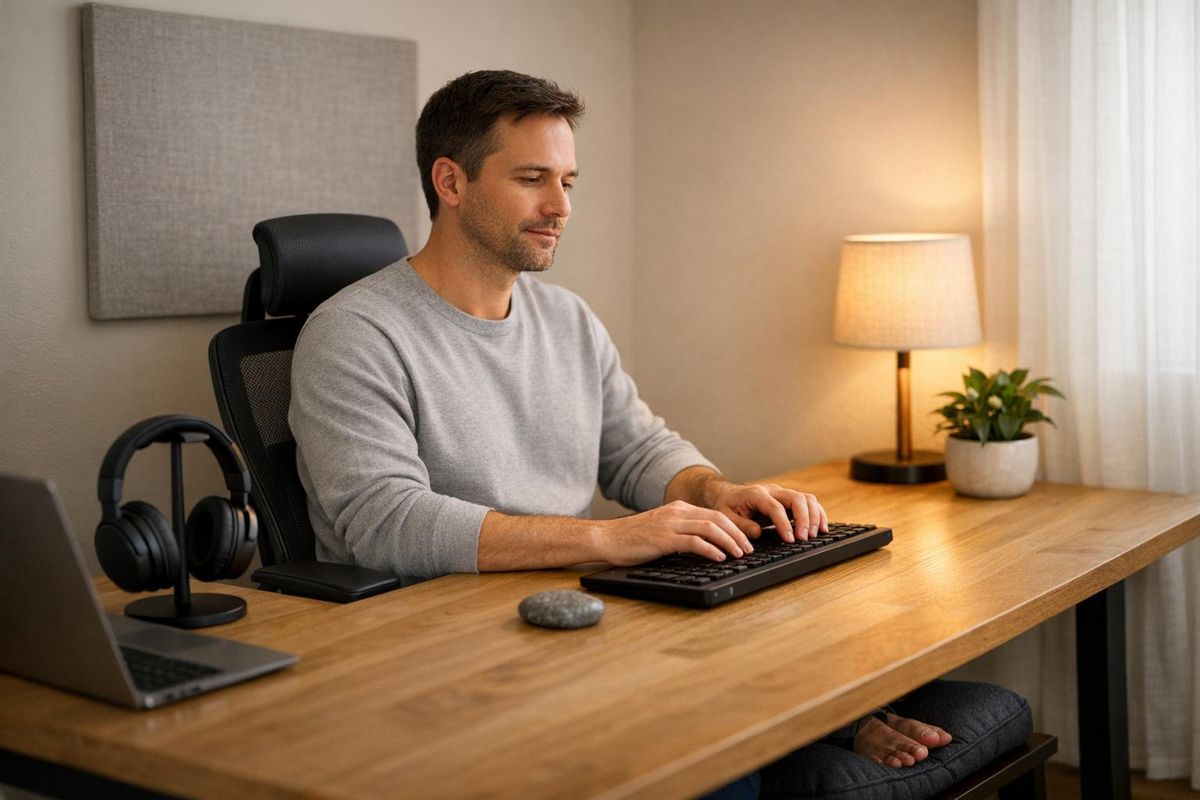
Your workspace might be making it harder to focus. For adults with ADHD, common distractions like harsh lighting, noise, and clutter can drain energy and reduce productivity. By making small, deliberate changes, you can create an environment that supports focus and reduces sensory overload. Here’s a quick look at how to adjust your workspace:
- Lighting: Use dimmable LED lamps or warm-toned bulbs to reduce overstimulation. Avoid fluorescent lights by using filters or personal desk lamps.
- Seating: Invest in ergonomic chairs or standing desks to improve comfort and posture. Movement-friendly tools like under-desk bikes or wobble chairs can also help.
- Sensory Tools: Silent fidget tools, weighted lap pads, and textured accessories can aid focus and reduce stress.
- Noise Control: Noise-canceling headphones and brown noise can block distractions. Acoustic curtains, rugs, and panels can further reduce noise levels.
- Organization: Use desk dividers, cable management tools, and color-coded systems to reduce visual clutter and keep essentials within reach.
Start with the most disruptive issues in your workspace, test small changes, and adjust as needed. These tweaks can help you stay focused and make work feel more manageable.
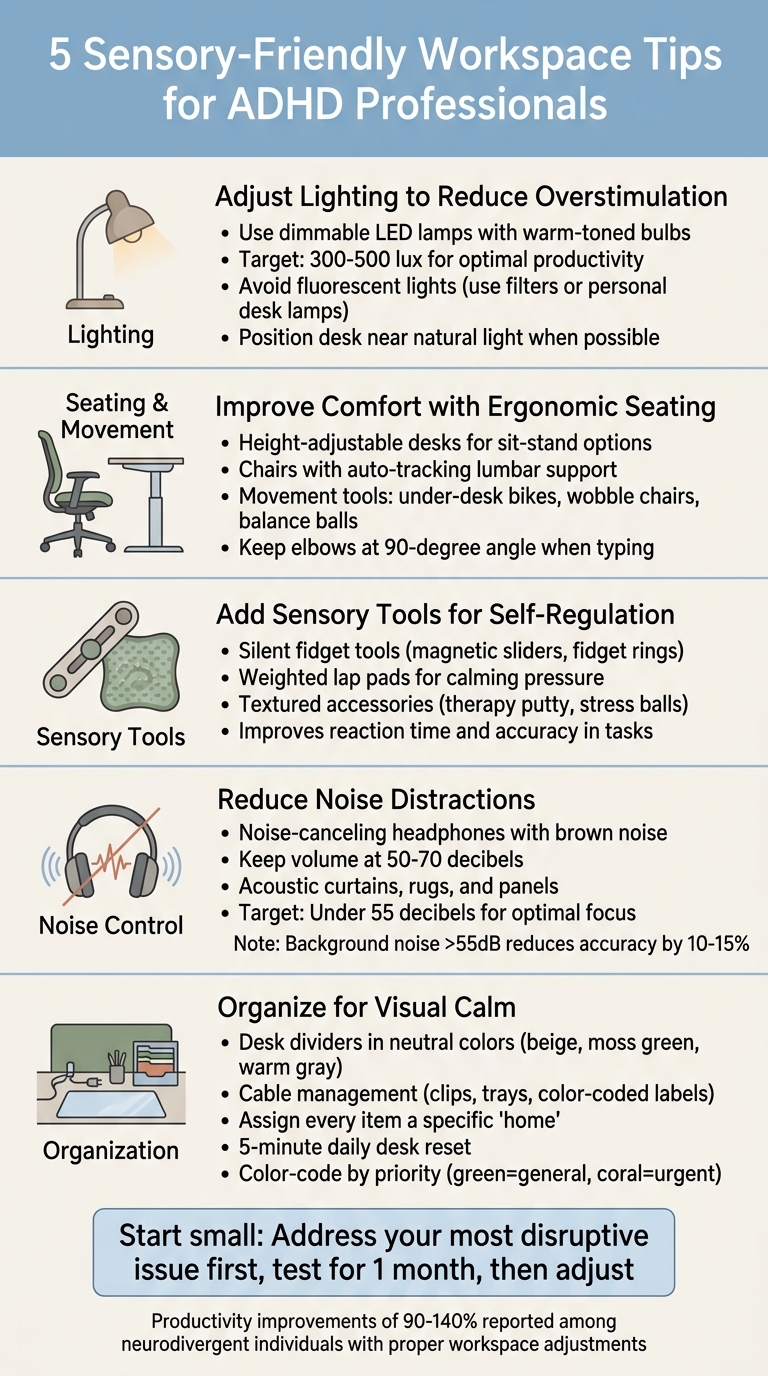
5 Sensory-Friendly Workspace Tips for ADHD Professionals
Make Your Office ADHD Friendly in 6 Easy Steps 🌻✨
sbb-itb-f879324
Adjusting Lighting to Reduce Overstimulation
Lighting often gets overlooked as a sensory trigger in workspaces, but for professionals with ADHD, it can be a game-changer. Harsh or flickering lights aren’t just annoying - they actively compete for your brain’s attention, draining mental energy before you even get started.
The first step is understanding your lighting needs. Research shows that workplaces aiming for 300–500 lux in general work areas have seen productivity improvements of 90% to 140% among neurodivergent individuals. That’s the difference between struggling to stay on task and hitting a productive flow.
Using Warm and Adjustable Lighting
Dimmable LED lamps are a powerful tool. Unlike fixed overhead lights, they let you adjust brightness to match your needs - lowering it during mentally taxing moments or increasing it for tasks requiring sharp focus. Gina Brady, Training Manager at the Fraser Sensory Supports Program, explains:
"Lighting plays an important role, with adjustable systems allowing employees to control brightness and temperature according to their needs."
If possible, position your desk near a window to take advantage of natural light. If that’s not an option, opt for warm-toned LED bulbs, which create a more calming environment than cool white ones. Shielded desk lamps are another great choice - they provide indirect light, avoiding harsh shadows and glare on your screen. For shared spaces, a personal task lamp (priced under $200) can give you control over your immediate lighting without disturbing others.
Once you’ve set up adjustable, warm lighting, the next step is eliminating lighting sources that work against you.
Avoiding Fluorescent Lighting
Fluorescent lights are a notorious trigger for sensory overload. Their subtle flicker and buzzing sound can cause distraction, discomfort, and even stress for many ADHD professionals.
If removing overhead fluorescents isn’t an option, consider using light covers or filters. These soften the harsh output and can make a big difference without requiring a complete lighting overhaul. Alternatively, turn off the overhead lights altogether and rely on your personal desk lamp. As Gina Brady points out:
"Avoid fluorescent lighting, which can be too bright. The buzzing sound from fluorescent lights may also be overwhelming."
For those dealing with symptoms like eyestrain, fatigue, or irritability due to poor lighting, switching to full-spectrum bulbs that mimic natural daylight can help. These bulbs, available for under $200, can significantly boost focus and comfort.
Improving Comfort with Ergonomic Seating and Movement
Discomfort can be a major distraction. When your back hurts or your neck feels strained, it’s hard to focus on anything else. Addressing physical discomfort doesn’t just make you feel better - it frees up mental energy for the work that really matters. Just like adjusting your lighting can reduce sensory strain, optimizing your seating and movement options can ease physical tension and sharpen your concentration.
Adding Ergonomic Chairs or Standing Desks
Sitting still for too long can feel restrictive. Instead of fighting the natural urge to move, consider furniture that supports movement. Height-adjustable desks, for example, let you alternate between sitting and standing, helping you stay active while staying focused.
Chairs with auto-tracking lumbar support can also make a big difference. They provide stability and reduce the need to fidget by keeping your posture aligned. If a professional standing desk isn’t in the cards, you can still elevate your monitor to eye level using a stack of books or a sturdy box. Just make sure your elbows stay at a 90-degree angle when typing to maintain good ergonomics.
Beyond seating, incorporating tools that encourage movement can help you stay engaged throughout your day.
Using Movement-Friendly Tools
Movement isn’t just a way to stay active - it’s a way to fuel focus. Certified ADHD Coach Caren Magill explains it this way:
"Movement isn't a distraction - it's fuel for your ADHD brain's focus engine."
The key is to match the tool to the task. For lighter activities like checking emails or watching videos, a walking pad or an under-desk pedal bike can keep you moving without breaking your flow. When you need to concentrate deeply, switch to a supportive ergonomic chair to maintain focus.
Active seating options, like wobble chairs or balance balls, encourage small movements that keep your core engaged without pulling your attention away from your work. For a tactile boost, keep quiet fidget tools, such as rubberized magnetic sliders like Stimagz, within reach - they’re subtle enough to use during meetings. Weighted lap pads can also provide calming pressure during moments of overstimulation, helping you feel grounded while still allowing freedom of movement.
Adding Sensory Tools for Self-Regulation
Engaging your brain while keeping your hands busy can make a big difference in managing focus. A study of 70 adults with ADHD revealed that using discreet fidget tools during cognitive tasks led to more consistent reaction times and improved accuracy. The trick is picking tools that match your sensory needs.
Fidget Tools for Focus
When working in shared spaces, the right fidget tools can help you stay focused without drawing attention. Magnetic fidget tools, like the Stimagz Series II, use neodymium magnets to create smooth, pattern-based motions that are silent - perfect for professional environments. Another option is silent fidget rings, which look like stylish jewelry but feature smooth bearings for discreet rotation under your desk or in your lap.
For those who prefer tactile feedback, therapy putty and kneadable erasers provide quiet, stress-relieving resistance. Stressless Fidget Balls, available for $18.99 for a set of two, are another great choice. Fidget pens with silent switches or rolling bearings offer sensory engagement without the distracting clicks. Cat Salladin, LSW from NeuroSpark Health, notes:
"By adding movement and consistent repetitive motions through the use of an adult fidget toy... ADHDers often find that they are able to focus much more intently on their tasks".
To keep things professional, stick to neutral-colored tools and use slow, controlled motions to avoid drawing attention. For additional sensory support, consider pairing these tools with weighted accessories.
Weighted and Textured Accessories
Weighted and textured tools can provide calming sensory input alongside fidget tools. Weighted items, like hand rolls, stress stones, and lap pads, offer deep pressure stimulation that can help anchor your attention and ease anxiety. For example, a Jumbo Weighted Lap Pad, priced at $88.99, delivers soothing pressure during stressful tasks or long periods of sitting.
Textured accessories can also provide subtle sensory input throughout the day. Adhesive "Zen Strips" placed under your desk or small fabric swatches (like velvet or corduroy) kept in your pocket offer discreet tactile stimulation. For foot-based movement, "Fidgeting Foot Bands" attached to chair legs allow for regulation through gentle movement without being visually distracting.
Under the ADA, you can request sensory tools as "reasonable accommodations" if they help improve your productivity without causing undue hardship.
Reducing Noise Distractions with Acoustic Solutions
Just like good lighting and ergonomic furniture improve your workspace, managing noise is just as important for staying focused. Noise can completely disrupt concentration. For example, background conversations louder than 55 decibels can decrease accuracy in analytical tasks by 10% to 15%, and a single interruption might cost you over 23 minutes to fully refocus. This is especially challenging for individuals with ADHD. About 43% of adult women with ADHD experience sensory over-responsivity, meaning sudden noises like door slams or notification chimes can quickly derail their attention. Thankfully, acoustic solutions, such as specialized headphones, can help reduce these distractions.
Using Noise-Cancelling Headphones
Noise-cancelling headphones are a game-changer for managing sensory overload. Take the Bose QuietComfort 45, for instance. Many ADHD professionals find it invaluable for blocking out environmental triggers like background chatter, traffic noise, or the hum of appliances. Lizzy Rager, Lead News Editor at The Daily Nexus, shared her experience:
"The moment I put them on in the store, the world fell into a wave of nothing. I stood in awe - the sounds I had been so conscious of, down to my very breaths, ceased to be".
Pairing headphones with brown noise can further enhance focus. Unlike white noise, brown noise is less tiring during extended work sessions and does a better job masking unpredictable office sounds. For the best results, keep the volume between 50 and 70 decibels. Start playing brown noise 2–3 minutes before diving into work to help your brain settle into focus mode. However, take occasional breaks from listening, as prolonged exposure (like 8 hours straight) can reduce its effectiveness. If these digital tools don’t fully solve the problem, physical adjustments can further reduce noise distractions.
Adding Sound-Absorbing Materials
Making physical changes to your workspace can significantly cut down on ambient noise. For example, acoustic curtains over windows or doorways absorb sound reflections, while thick wool or plush rugs with dense felt underlays prevent sound from bouncing off hard floors. If you seal air leaks around doors using weatherstripping tape or automatic door bottoms, you can lower noise levels by 5 to 12 decibels, as sound easily seeps through gaps.
For those who rent or can’t make permanent changes, free-standing acoustic panels (also known as gobos) offer a flexible solution. Even everyday items can help: well-stocked bookshelves scatter sound waves, acting as diffusers, while upholstered furniture like sofas absorbs low-frequency sounds and reduces echoes. The goal? Keep your workspace noise levels under 55 decibels to maintain focus and accuracy.
Organizing for Visual Calm and Less Clutter
Visual clutter can sap your mental energy. Every item in your line of sight forces your brain to work harder to filter out distractions. For professionals with ADHD, this creates a tough balancing act: keeping things visible prevents the "out of sight, out of mind" trap, but too much visual stimulation can make focusing nearly impossible. The goal isn't to aim for a spotless, minimalist workspace - it’s about smart organization that reduces unnecessary friction. Here’s how you can create a space that feels calm and manageable.
Using Desk Dividers and Organizers
Desk dividers are great for creating subtle visual boundaries, especially in open offices where peripheral distractions are constant. Options like fabric panels, cork boards, or pegboards can block out movement and help you stay focused. When choosing dividers, stick to soft, neutral colors like beige, moss green, or warm gray. Avoid stark white, which can feel too harsh and overstimulating.
Pair these dividers with closed storage solutions to keep clutter out of sight. Assign every item a specific "home" to reduce decision-making fatigue. ADHD expert Lud from ADHD Wisdom Tools emphasizes the importance of this:
"When an item has one home: You stop scanning, you stop guessing, you stop burning energy. Less friction = more focus available for actual work".
End each workday with a quick five-minute reset. Return everything to its designated spot to ensure your desk is clear and ready to support your focus the next morning.
Color-Coding and Cable Management
Cable mess is another sneaky source of visual stress. Tangled cords not only look chaotic but also quietly drain your focus. Use tools like cable clips, trays, or sleeves to keep cords organized and out of sight. Route cables away from walkways to eliminate tripping hazards, and use color-coded labels to quickly identify which cord belongs to what.
Color-coding can also help organize your broader workspace. Assign colors to folders or notes based on priority - green for general tasks, coral for urgent ones - so your brain can instantly recognize what needs attention. A label maker is another handy tool for creating clear, easy-to-read labels, offering what some call "external executive scaffolding" to support a smoother workflow.
Keep only the essentials visible on your desk and store the rest to reduce mental overload. As Matthew Ryan, LCSW, from PRGRS Therapy, points out:
"We often design our offices for the person we wish we were, not the person we actually are. And that mismatch? It's costing you productivity, energy, and peace of mind".
Conclusion
Adjusting your workspace can make a world of difference when it comes to minimizing sensory overload. By using thoughtful strategies - like tweaking lighting or incorporating movement tools - you can create an environment that promotes focus and productivity. The suggestions shared here aim to lighten mental strain and help you harness your natural abilities effectively.
It’s all about trial and error. What works for one person with ADHD won’t necessarily work for another, and your needs may even vary daily. Lifestyle journalist Lexi Inks highlights this perfectly:
"Assessing what I feel I need that day and making small adjustments has been a major game-changer. Listen to your rhythms and figure out what works for you so that you can grace others with the critical and creative thought that so often comes along with ADHD." - Lexi Inks, Lifestyle Journalist
Start small. Tackle the most disruptive distractions first, whether it’s swapping out harsh lighting or adding a single fidget tool. Make one change, give it a month, and then evaluate how it impacts your focus. Adjust as needed to find what suits you best.
Your workspace should amplify your strengths - whether it’s hyperfocus, creativity, or problem-solving - not hinder them. These adjustments can help you channel your energy into achieving your goals.
FAQs
What’s the best first change to make if I feel overwhelmed at my desk?
Minimizing visual clutter at your desk can make a big difference in your ability to focus. Start by clearing away anything that isn’t essential - this includes knick-knacks, outdated papers, or random items that tend to pile up. Keep only the materials you actually need within your line of sight. This small change can help cut down on sensory distractions, making your workspace feel calmer and more manageable, especially if you’re navigating ADHD challenges.
How do I ask my employer for sensory-friendly accommodations?
To request sensory-friendly accommodations, start by explaining how sensory challenges impact your ability to perform at your best. For example, you might mention how bright lights, loud environments, or constant background noise make it difficult to focus or complete tasks effectively. Then, suggest specific adjustments that could help, such as softer lighting, noise-canceling headphones, or access to a quieter workspace.
When making your request, frame it as a way to improve your productivity and overall work performance. Emphasize that these adjustments are reasonable and fall under the protections provided by the Americans with Disabilities Act (ADA). Be as clear and specific as possible about what you need, so your employer understands how these changes will contribute to a more effective and supportive work environment.
How can I stay organized without creating more visual clutter?
To maintain an organized workspace without overwhelming it visually, start by removing unnecessary items and keeping only what you need close by. Use practical storage options like bins or shelves to neatly arrange your materials. Designate specific zones for different tasks, and label storage areas to make it easier to keep things in their place. This setup minimizes distractions, creates a more serene environment, and helps you stay focused on your work.