7 Tips to Handle Interruptions at Work with ADHD
ADHD-friendly tactics—Do Not Disturb, scheduled check-ins, catch‑all notes, timers, and workspace tweaks to reduce interruptions.

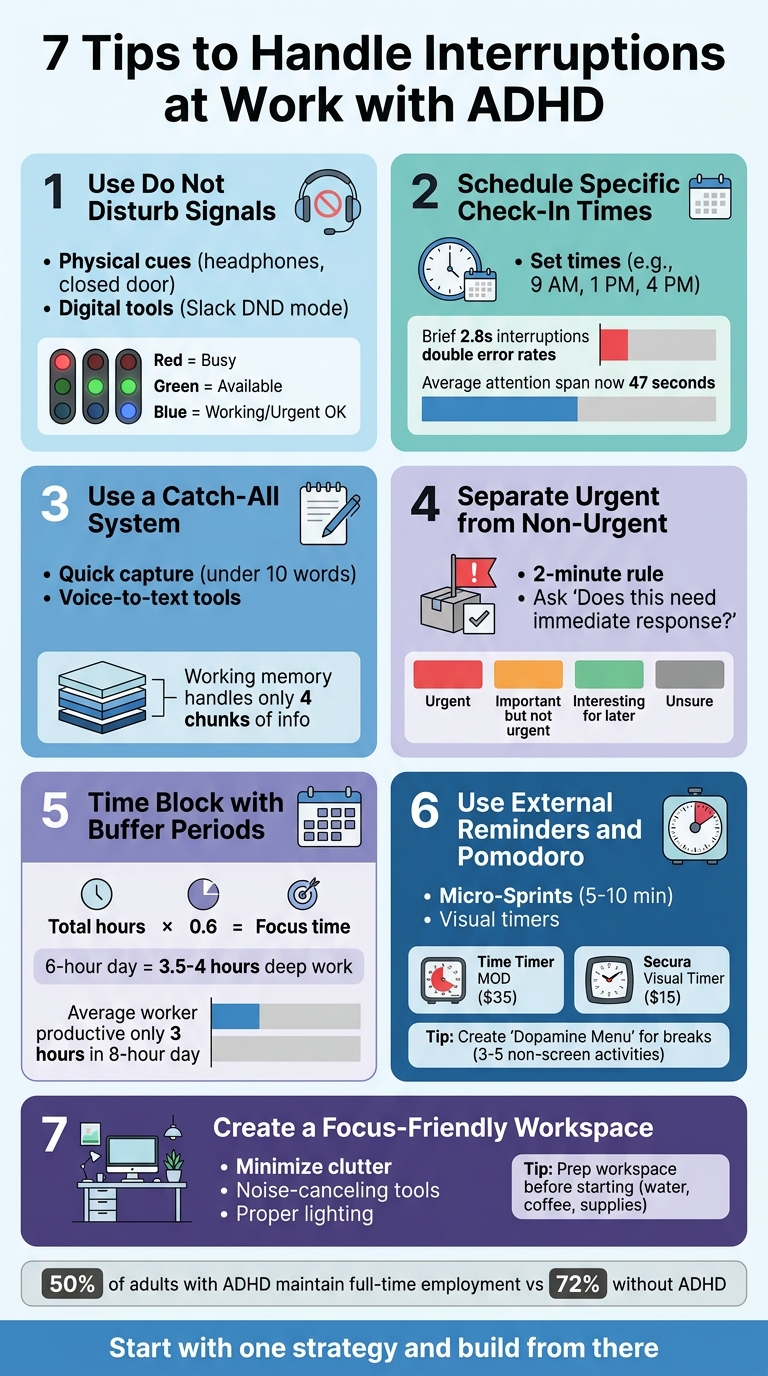
Interruptions at work can feel overwhelming, especially if you have ADHD. They disrupt focus, drain mental energy, and make it harder to get back on track. But with the right strategies, you can regain control and stay productive. Here’s a quick summary of the seven tips covered in this article:
- Use Do Not Disturb Signals: Set clear boundaries with physical cues (like headphones) and digital tools (like Slack’s “Do Not Disturb” mode).
- Schedule Specific Check-In Times: Limit distractions by checking emails and messages at designated times.
- Use a Catch-All System: Jot down interruptions or tasks quickly to avoid losing focus.
- Separate Urgent from Non-Urgent Matters: Prioritize tasks and set boundaries for non-urgent requests.
- Time Block with Buffer Periods: Plan flexible blocks of work time with built-in buffers for interruptions.
- Use External Reminders and Pomodoro: Leverage visual timers and shorter focus sessions to combat time blindness.
- Create a Focus-Friendly Workspace: Minimize distractions by organizing your desk, reducing noise, and prepping your space.
These practical steps can help you manage interruptions, improve focus, and reduce stress at work. Let’s explore how each tip works in detail.
7 Strategies to Handle Work Interruptions with ADHD
5 Hacks To Handle Interruptions at Work & Home | Episode 302
sbb-itb-f879324
1. Use Do Not Disturb Signals
Setting up clear "Do Not Disturb" signals can help protect your focus and minimize interruptions. Let your colleagues know about these signals ahead of time, so they understand when you're unavailable. Combining physical cues with digital tools creates a strong barrier against distractions.
In office settings, physical signals like a closed door, wearing headphones, or placing a specific item on your desk can indicate you're in deep focus mode. For remote or hybrid work, leverage tools like the "Do Not Disturb" settings on your phone or communication platforms like Slack. These features let others know you're not immediately reachable. You can also try LED busy lights - red for "busy", green for "available", and blue for "working but open to urgent matters." These lights are practical and cost about $40.
"Turn off your phone or use a 'do not disturb' app or setting during these work periods... Limiting access and the distraction of your phone will improve your focus and sustained attention." – Sharon Saline, Psy.D.
If someone interrupts despite your signals, avoid asking if it can wait. Instead, politely but firmly state that you're busy and will follow up in about an hour. This approach reinforces your boundaries.
For additional focus, close any non-work browser tabs and disable desktop notifications. By reducing digital distractions like pings and pop-ups, you can stay locked in and maintain your momentum during critical work sessions.
2. Schedule Specific Check-In Times
Setting specific check-in times can help limit constant digital distractions and create a structured way to manage attention challenges commonly associated with ADHD. For example, you could designate times like 9:00 AM, 1:00 PM, and 4:00 PM to handle emails and messages, while keeping communication apps closed outside of these windows.
"Set specific check times. Maybe 9am, 1pm, and 4pm. Outside those windows, close your email completely. Yes, completely. If something is truly urgent, people will find another way to reach you." – Expert ADHD Coaching Team, Decoding ADHD
This strategy addresses a common ADHD hurdle known as attention residue. Studies reveal that even brief interruptions - just 2.8 seconds - can double error rates in tasks requiring ordered steps. On top of that, the average knowledge worker now shifts between activities roughly every three minutes, with screen-based attention spans shortening to about 47 seconds. By introducing set routines, you can protect your focus and minimize these disruptions.
Consider scheduling a short, 15-minute weekly check-in with your manager or a trusted colleague to review priorities and clarify what "done" looks like for key tasks. This habit can reduce the mental load of juggling multiple responsibilities and counteract time blindness, which often leads to weeks slipping by without progress on essential work. Additionally, communicate your most productive working hours and carve out 60–90-minute blocks two to four times a week for uninterrupted focus. This balance not only strengthens your workflow but also alleviates stress caused by missed messages or concerns about responsiveness.
3. Use a Catch-All System
Your brain is designed to process information, not store it. Trying to juggle multiple tasks, ideas, or interruptions in your head can overwhelm your working memory, which can only manage about four chunks of information at a time. For professionals with ADHD, this limitation becomes even tougher when interruptions pile up.
A catch-all system offers a quick way to unload these mental burdens. Keep a notepad or digital scratchpad handy to jot down random thoughts, incoming tasks, or interesting links in seconds. The key is to capture these thoughts quickly - in under 10 words - so you can return to your work without losing focus. For instance, if a colleague interrupts you while you’re deep in a task, you might write "Email client re: invoice" and immediately get back to what you were doing. This simple habit reduces mental strain and makes it easier to pick up where you left off.
By writing things down, you also reduce "attention residue" - those lingering thoughts about unfinished tasks that drain your mental energy even after you’ve shifted focus. Sophie Leroy from the University of Washington explains:
People need to stop thinking about one task in order to fully transition their attention and perform well on another. Yet, results indicate it is difficult for people to transition their attention away from an unfinished task.
When you jot down interruptions, you give your brain permission to let them go.
For those with ADHD who often think faster than they type, voice-to-text tools can be a game-changer. Use your phone’s voice memo app or AI tools like ChatGPT voice to quickly capture ideas or tasks. Later, you can organize these into actionable lists. Similarly, "read-it-later" apps are great for saving articles or research you stumble upon during work, turning revisiting them into a reward for completing your current task.
The real advantage of a catch-all system isn’t just about capturing interruptions - it’s about making it easier to get back to work. Before addressing an interruption, take three seconds to note your next action. This quick bookmark turns restarting your task into a simple "read-and-resume" process, cutting recovery time to just 30 to 60 seconds instead of several minutes.
4. Separate Urgent from Non-Urgent Matters
Not every interruption needs to derail your focus. A quick Slack message or a seemingly minor question can feel urgent in the moment, but it’s important to step back and assess whether it truly requires immediate attention.
To manage interruptions effectively, start by asking yourself, "Does this need an immediate response?" If the answer is no, then it’s likely important but not urgent. Tasks with hard deadlines - like a client presentation or a teammate waiting on your input - should take priority. On the other hand, soft deadlines, such as "sometime this week" requests, can be slotted into your schedule for later. When faced with interruptions, try setting boundaries with quick responses like, "Let me check my schedule and get back to you" or "I’ll respond by tomorrow." This approach gives you time to evaluate the request without losing focus on your current work.
For smaller tasks, a simple rule works well: If it’ll take less than two minutes, handle it right away. Otherwise, add it to your to-do list. For more complex requests, ask your colleagues to provide written context. A short message that includes a clear "decision needed" note can help you quickly determine if it’s urgent or can wait.
To stay focused, manage incoming communication deliberately. Let phone calls go to voicemail and check them at set times. Use a labeling system to sort tasks into categories like "Urgent", "Important but not urgent", "Interesting for later", and "Unsure". When someone interrupts with a request, let them know you’ll add it to your task list rather than addressing it immediately. This small step allows your mind to release the new information and refocus on what you were doing.
Clear communication is just as important as identifying urgency. Avoid vague statements and set firm boundaries, like saying, "I’m unavailable until 2:00 PM". As Dr. George Sachs from the Sachs Center explains:
Rules you set for yourself and for others… They're needed for emotional and mental health.
5. Time Block with Buffer Periods
For professionals with ADHD, traditional time blocking can feel overly rigid. Just one unexpected interruption can throw an entire day off track. Instead, try a more flexible approach by intentionally under-scheduling your day to include buffer periods.
Here’s how it works: calculate your focus time by multiplying your total work hours by 0.6. For example, in a 6-hour workday, plan for 3.5–4 hours of focused, deep work. Use the remaining time as buffers to handle interruptions like Slack messages, context switching, or last-minute requests. This aligns with research showing that the average office worker is only productive for about 3 hours during an 8-hour day.
To make this even more adaptable, treat your calendar as a living document. Use movable time blocks that can shift or shrink as needed. For instance, if a 90-minute work session gets interrupted, figure out the Minimum Viable Block - usually 15–30 minutes - that you need to make progress, and focus on completing that.
Between deep work sessions, schedule 30-minute buffer blocks for tasks like emails, admin work, or quick follow-ups. To stay organized, color-code these buffer blocks to reflect intentional planning. At the end of the day, spend 10 minutes reallocating any unfinished tasks. This method helps you stay on track despite workplace interruptions and is particularly helpful for managing ADHD.
6. Use External Reminders and Pomodoro
For those with ADHD, managing time can feel like an uphill battle. Time blindness - the difficulty in perceiving the passage of time - can make staying on track a real challenge. This is where external reminders come into play. They act as a support system, helping you stay aware of time and avoid getting stuck in hyperfocus, which can lead to burnout or missed priorities.
Traditional Pomodoro blocks of 25 minutes might feel overwhelming for someone with ADHD. Instead, try shorter "Micro-Sprints" lasting just 5–10 minutes. This method, often called the "Liar's Timer", makes starting easier by telling yourself you can stop when the timer rings. More often than not, the momentum will keep you going. Some professionals also find virtual body doubling tools helpful in maintaining focus.
Visual timers can be game-changers for ADHD brains. Unlike digital clocks, tools like the Time Timer MOD ($35) or the Secura 60-Minute Visual Timer ($15) use a shrinking colored disk to represent remaining time. This visual cue makes it easier to understand how much time you have left at a glance. It also helps you refocus after interruptions by quickly showing where you left off.
When disruptions happen, don’t let them derail your progress. Use a quick reset strategy: revisit your bookmark or notes from your organizing system, take a short two-minute break to stretch, breathe, or grab some water, then restart your timer. These small actions can help you regain focus and get back on track.
To enhance your focus even further, create a "Dopamine Menu" for your breaks. This is a list of 3–5 simple, non-screen activities like stretching, taking a short walk, or grabbing a coffee. Avoid scrolling on your phone, as the high stimulation can make it harder to return to work afterward. If you're in a groove when the timer goes off, take a moment to assess how you're feeling. If everything feels good, extend your session by 15 minutes using the "Flow Exception Protocol", which allows you to honor your natural rhythm while staying productive.
7. Create a Focus-Friendly Workspace
Your workspace plays a huge role in how well you can focus. As lifestyle journalist Lexi Inks puts it:
the environment I work in is incredibly influential in my ability to mitigate its symptoms.
Even small adjustments to your setup can make a big difference.
Start by thinking about where your desk is placed. Try to set it up away from busy areas like breakrooms or hallways. Facing your desk toward a wall or a neutral surface instead of an open space can also help cut down on visual distractions.
Next, tackle clutter. A messy desk can be surprisingly distracting. Keep only what you need for your current task on the desk, and store everything else in labeled bins or drawers. Clinical psychologist Sharon Saline highlights this point:
Clutter is just another distraction that can get in the way of you doing your best.
Make it a habit to tidy up your workspace daily so you can start each day with a clean slate.
For noise, consider tools like noise-canceling headphones or white/brown noise machines to block out office sounds. If you tend to fidget, options like a standing desk, balance board, or fidget tools can help channel that energy without pulling your attention away. Lighting also matters - smart bulbs like Philips Hue or LIFX let you adjust the brightness and color temperature to match your needs. Cool light can help you stay alert during work, while warm light is better for winding down.
Lastly, prep your workspace before diving into work. Have everything you need - water, coffee, notebooks, chargers - within arm’s reach to avoid unnecessary interruptions. Even small steps like using separate browsers for work and personal tasks can help you stay on track by reducing the temptation to wander into non-work-related websites. These changes, while simple, can significantly cut down on distractions and help you stay focused.
Conclusion
The seven strategies outlined here offer a practical framework for managing workplace interruptions, especially for individuals with ADHD. These tips - like using visual timers, setting up catch-all systems, and designing focus-friendly work environments - help create external supports that align with your unique focus needs. They act as tools to strengthen your executive functions and foster better productivity.
Consistently applying these strategies not only improves focus but also enhances how others perceive you in a professional setting. As psychologist Sharon Saline explains:
When you consistently meet your deadlines, you will gain a reputation for being reliable and conscientious.
This is particularly important given the challenges many adults with ADHD face. Only 50% of adults with ADHD maintain full-time employment, compared to 72% of adults without the condition.
Beyond boosting productivity, these habits help reduce stress, prevent burnout, and leverage ADHD strengths like creativity and problem-solving. The aim isn't perfection but steady progress that leads to greater career satisfaction and stability over time.
For additional ADHD resources, check out On/Off Genius. Recognizing how your brain works differently isn't a limitation - it’s a powerful step toward working with your ADHD instead of against it. Start incorporating these strategies and see the difference they can make in your work life.
FAQs
How do I set boundaries without seeming rude?
To set boundaries in a polite and effective way, it's important to communicate with both clarity and respect. A helpful approach is using the 4 C’s of boundary setting: clarity, consistency, compassion, and courage. For instance, you might say, "I need to focus on this task right now", or "I appreciate your understanding, but I need to step away." These phrases strike a balance between being kind and assertive, making it easier for others to respect your needs while you protect your own well-being.
What should I do when 'urgent' requests aren’t actually urgent?
When faced with a request, it's essential to take a step back and assess its actual importance. Ask yourself: Does this task truly require immediate attention, or is it just being framed as urgent? Setting clear boundaries is key here. By prioritizing tasks that genuinely matter, you can avoid getting sidetracked by things that only seem pressing.
This approach helps you stay in control of your workload and keeps unnecessary stress at bay. Thoughtful management of such situations ensures you focus your energy where it’s needed most, rather than reacting to every demand that comes your way.
Which ADHD tools help me refocus fastest after an interruption?
The fastest ways to regain focus after interruptions include using tools and techniques designed to get your mind back on track. Apps like Brain.fm provide focus-enhancing audio based on science, while Pomodoro timers such as Focus Keeper help structure your work into manageable sessions.
You can also try a quick reset routine: take a brief pause, practice deep breathing exercises, or adjust your workspace to eliminate distractions. These simple strategies can make it easier to recover your concentration and reduce the impact of disruptions during your workday.